
You’re spending 5 – 8 hours weekly on tasks an AI assistant can reduce to 90 minutes. That’s not a productivity issue, that’s a leverage problem.
Gemini AI for students is Google’s generative AI assistant designed to help with research, homework, writing, note-taking, and exam prep.
Used strategically, it improves speed and clarity. Used carelessly, it creates dependency and academic risk.
In this guide, you’ll learn exactly how to use Gemini AI for students in 2026 – ethically, efficiently, and intelligently.
What Is Gemini AI for Students and How Does It Help?
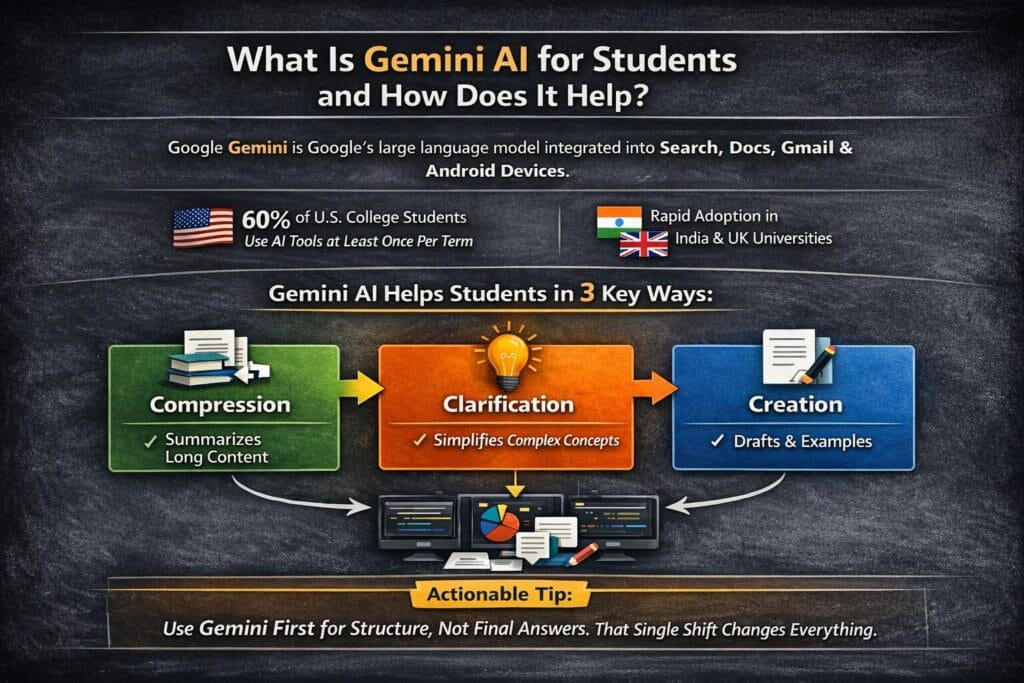
Google Gemini is Google’s large language model integrated into Google Search, Docs, Gmail, and Android devices. For students, it functions as:
- AI homework helper
- AI research assistant for students
- AI writing assistant education tool
- AI note-taking assistant
- AI exam preparation companion
According to the 2024 EDUCAUSE Student Technology Report, over 60% of U.S. college students reported using generative AI tools for academic tasks at least once per term.
In India and the UK, adoption is rising rapidly as universities formalize AI usage policies.
Gemini AI for students helps in three primary ways:
- Compression – Turns long content into structured summaries
- Clarification – Explains complex concepts simply
- Creation – Drafts structured outlines and examples
Actionable Tip: Use Gemini first for structure, not final answers. That single shift changes everything.
Is Gemini AI Free for Students?
Gemini offers a free tier, which covers most basic academic tasks. Some advanced features may require paid Google plans.
For high school and undergraduate students, the free version supports:
- Homework explanations
- Essay outlines
- Study guide creation
- Brainstorming
- Revision assistance
However, heavy research usage may hit daily limits.
For pricing and model details, refer to Google’s official documentation:
https://ai.google.dev/
Before relying on it, check your university’s AI policy. Many institutions now publish guidelines similar to those outlined by the OECD AI in Education framework:
https://www.oecd.org/education/
How Students Actually Use Gemini AI for Homework

Let’s move beyond theory.
1. Essay Structuring
Instead of asking:
“Write my essay on climate change.”
Ask:
“Create a structured outline for a 1,200 – word essay on climate change policy in India, including thesis, three arguments, counterargument, and conclusion.”
Result:
Clear thesis. Logical structure. Time saved: ~40 minutes.
2. Math & Science Help
Gemini AI for students can solve algebra, calculus, and physics problems step-by-step.
Better prompt:
“Explain how to solve this quadratic equation step-by-step at a 10th-grade level and provide a similar practice problem.”
Clarity increases dramatically when you define the grade level.
3. Research Summaries
Paste 1,500 words of notes.
Ask:
“Summarize into 12 bullet points suitable for exam revision.”
Instant revision sheet.
4. Competitive Exam Preparation
Students preparing for UPSC, GRE, or SAT use Gemini to:
- Generate mock questions
- Simplify constitutional articles
- Break down historical timelines
If you’re exploring broader AI productivity tools, you may also find this relevant:
https://dailyaiwire.com/deep-learning-frameworks-guide-2026/
We Tested Gemini AI for Common Student Tasks (2026 Study Test)
To understand how useful Google Gemini AI really is for students, we tested it on several common academic tasks that students perform every day.
Our goal was simple: evaluate how well Gemini performs when helping with writing assignments, solving math problems, summarizing research material, and generating study tools like flashcards.
Below are the results from our practical testing.
Test Results Overview
| Student Task | Result | Summary |
|---|---|---|
| Essay Writing | Very Good | Produces structured essays with clear arguments |
| Math Problem Solving | Moderate | Works well for explanations but struggles with complex calculations |
| Research Summary | Excellent | Quickly summarizes long academic text accurately |
| Flashcard Generation | Good | Creates helpful revision flashcards for quick study |
1. Essay Writing – Very Good
We asked Gemini to generate a 1000-word essay on climate change impacts suitable for a high school assignment.
What Gemini did well
- Structured the essay with introduction, body, and conclusion
- Used clear academic tone
- Provided logical arguments and examples
Limitations
- Some sentences were slightly repetitive
- Citations were not always included automatically
Overall, Gemini works very well for essay drafts, outlines, and editing assistance. Students should still review and personalize the content before submitting assignments.
2. Math Problem Solving – Moderate
We tested Gemini with algebra and calculus problems.
Strengths
- Explains step-by-step solutions
- Helpful for understanding concepts
- Good for practice questions
Weaknesses
- Occasionally miscalculates complex equations
- Not always reliable for advanced mathematics
Gemini is best used as a learning assistant, not as the final calculator for difficult math problems.
3. Research Summary – Excellent
One of Gemini’s strongest abilities is summarizing large amounts of information quickly.
We tested this by giving Gemini a long research article (1500+ words) and asking for a concise summary.
Gemini successfully:
- Extracted key ideas
- Organized the summary into bullet points
- Maintained the core meaning of the text
For students working on research papers, projects, or exam revision, this feature saves a huge amount of time.
4. Flashcard Generation – Good
Students often use flashcards for memorization and revision.
We asked Gemini to convert a biology chapter into flashcards.
Results:
- Generated clear question-and-answer format cards
- Highlighted key terms and definitions
- Organized concepts logically
However, some cards were too long, so students may need to simplify them further.
Still, Gemini can significantly speed up the revision process before exams.
Final Verdict from Our Testing
After testing Gemini across multiple academic tasks, we found that it performs best in areas that involve language understanding and summarization.
Best uses for students:
- Essay drafting and editing
- Research summaries
- Study notes generation
- Flashcards and quizzes
Tasks where caution is needed:
- Advanced mathematics
- Highly technical subjects
When used correctly, Gemini AI can act as a powerful study assistant, helping students save time and understand complex topics more efficiently.
Best Gemini Prompts for Students (Prompt Engineer Guide)
Many students use AI tools incorrectly by asking basic questions. The key to getting powerful results from Google Gemini AI is using well-structured prompts.
Below are tested prompt templates students can copy and paste to study faster, understand complex topics, and prepare for exams.
1. Simplify Complex Topics
When a topic feels confusing, ask Gemini to explain it in simpler language.
Prompt
Explain [topic name] in simple terms as if you are teaching a 12-year-old student.
Use examples and avoid complex terminology.
Example
Explain quantum physics in simple terms as if you are teaching a 12-year-old student.
Best for
- Science concepts
- Economics theories
- Technical subjects
2. Generate Quiz Questions
Testing yourself improves memory and exam preparation.
Prompt
Create a 10 question quiz based on the following notes.
Include multiple choice questions and provide the correct answers at the end.[Paste your notes here]
Best for
- Exam revision
- Self-testing
- Practice questions
3. Summarize Long Study Material
Students often struggle with long textbooks or research articles.
Prompt
Summarize the following text into clear bullet points.
Highlight the most important ideas and key definitions.[Paste the text or chapter]
Best for
- Research papers
- Lecture notes
- Study guides
4. Convert Notes Into Flashcards
Flashcards are powerful for memorization and quick revision.
Prompt
Convert the following notes into flashcards.
Each flashcard should contain one question and one clear answer.[Paste your notes]
Best for
- Biology terms
- Historical dates
- Vocabulary learning
5. Step-by-Step Problem Solving
For math or science problems, Gemini can explain the full process.
Prompt
Solve the following problem step by step and explain the reasoning clearly so a student can understand the logic.[Paste the problem]
Best for
- Algebra
- Physics calculations
- Chemistry problems
6. Create a Study Plan
Students often struggle with organizing their time.
Prompt
Create a 7-day study plan for learning [subject].
Include daily topics, revision time, and practice questions.
Example
Create a 7-day study plan for learning organic chemistry before exams.
7. Turn a Chapter Into Key Concepts
This helps students quickly grasp important topics.
Prompt
Read the following chapter and extract the 10 most important concepts students must understand for exams.
Explain each concept briefly.[Paste chapter text]
8. Improve Essay Writing
Students can use Gemini to improve writing quality.
Prompt
Review the following essay and improve clarity, grammar, and structure.
Do not change the meaning of the content.[Paste essay]
9. Create Practice Exam Questions
Prompt
Act as a teacher and create exam-level questions based on the following topic.
Include short answer and long answer questions.Topic: [insert topic]
10. Explain Mistakes in Answers
Students learn faster when they understand mistakes.
Prompt
Review the following answer and explain what is incorrect.
Then provide the correct explanation.[Paste answer]
Pro Tip for Students
The more context you give Gemini, the better the results.
Good prompts usually include:
- the topic
- the goal (explain, summarize, quiz)
- the format (bullet points, steps, flashcards)
This technique is often called prompt engineering, and it helps students turn AI into a powerful study assistant.
Gemini AI for Students vs Other AI Study Tools
Let’s compare the ecosystem.
| Tool | Best For | Cost | Strength | Limitation |
|---|---|---|---|---|
| Gemini AI | Research + structured writing | Free + paid | Strong Google integration | Citation hallucination risk |
| ChatGPT | Conversational reasoning | Free + Plus | Deep contextual answers | Less native Google integration |
| Microsoft Copilot | Office tasks | Paid | Word & Excel automation | Less flexible prompts |
| Grammarly | Editing | Free + Premium | Polishing & tone | Not deep research |
| Perplexity AI | Citation-backed research | Free + Pro | Live references | Limited drafting depth |
If you want a broader breakdown of AI productivity ecosystems, you may also explore:
https://dailyaiwire.com/ai-bubble-fears-global-markets-warning-signals/
Gemini vs ChatGPT vs Claude for Students
Artificial intelligence tools are becoming essential study assistants for many students. While Google Gemini, ChatGPT, and Claude all provide powerful capabilities, they each have strengths and limitations depending on how students plan to use them.
Below is a simple comparison based on common academic tasks like writing essays, summarizing research, and generating study materials.
AI Tool Comparison for Students
| AI Tool | Best For | Weakness |
|---|---|---|
| Gemini | Research, Google Docs integration, summarizing notes | Sometimes gives longer responses |
| ChatGPT | Detailed explanations, coding help, concept breakdown | Less direct integration with Google apps |
| Claude | Writing assistance, long document analysis | Fewer integrations with productivity tools |
1. Google Gemini
Gemini is especially useful for students who already use the Google ecosystem. It integrates smoothly with tools like Google Docs, Drive, and Gmail, making it easier to summarize notes, draft assignments, or analyze research material.
Best uses for students
- Summarizing lecture notes
- Research assistance
- Generating study guides
- Working inside Google Docs
However, Gemini sometimes produces longer answers than necessary, which may require students to refine prompts.
2. ChatGPT
ChatGPT is widely used for step-by-step explanations and tutoring-style responses. Students often rely on it to understand complex topics such as programming, mathematics, and science concepts.
Best uses
- Breaking down difficult topics
- Learning coding concepts
- Writing explanations and essays
- Generating practice questions
Its main limitation for students is that it does not integrate as deeply with Google productivity tools.
3. Claude
Claude is known for its strong writing abilities and long-document analysis. It performs well when students need to analyze research papers, essays, or large reading materials.
Best uses
- Editing essays
- Summarizing large documents
- Research analysis
However, Claude currently has fewer integrations with other productivity tools, which can limit some workflows.
Which AI Tool Is Best for Students?
Each AI assistant serves different academic needs:
- Gemini → Best for research and Google Workspace users
- ChatGPT → Best for explanations and tutoring-style learning
- Claude → Best for writing and document analysis
Many students actually use multiple AI tools together to get the best results for studying, writing assignments, and exam preparation.
Can Gemini AI Write Assignments and Essays?
Yes. But here’s the honest answer.
Gemini AI can:
- Draft full essays
- Improve grammar
- Suggest citations
- Rewrite paragraphs
- Expand bullet points
But submitting unedited AI output can violate academic policies.
A 2023 Stanford HAI report highlighted that generative AI systems still produce hallucinated references under certain prompts.
Most articles won’t tell you this, but…
Professors are increasingly requiring:
- Draft history submissions
- In-class writing
- AI disclosure statements
Better workflow:
- Generate outline
- Write draft yourself
- Ask Gemini to critique
- Refine in your voice
That strengthens thinking instead of replacing it.
How Accurate Is Gemini AI for Academic Use?
Accuracy depends on domain.
| Subject Type | Reliability |
|---|---|
| General history | High |
| Concept explanation | High |
| Legal citations | Medium |
| Medical data | Risky |
| Hyper-specific research | Variable |
Always verify using:
- Google Scholar
- University library databases
- Peer-reviewed journals
You can also cross-check answers using citation-backed AI like Perplexity AI.
For deeper understanding of AI limitations in real-world scenarios, see this coverage:
https://dailyaiwire.com/sam-altman-internal-memo-google-ai/
How Students Use Gemini for Studying
Many students now use Google Gemini as a daily study assistant. Instead of just asking random questions, successful students follow a structured workflow that helps them understand topics faster and prepare better for exams.
Below is a simple step-by-step workflow students can use to turn Gemini into a powerful study partner.
Step 1 – Upload or Paste Class Notes
Start by gathering your lecture notes, textbook sections, or research material.
Students can either:
- Paste notes directly into Gemini
- Upload documents such as PDFs
- Copy sections from textbooks or slides
Example prompt:
Analyze the following class notes and identify the key concepts students need to understand for exams.
This allows Gemini to understand the context of the study material.
Step 2 – Ask Gemini to Summarize the Topic
Once the material is uploaded, students can ask Gemini to create a simplified summary.
Example prompt:
Summarize these notes into clear bullet points and highlight the most important ideas.
This step helps students quickly identify the core concepts without reading long chapters repeatedly.
Step 3 – Generate Flashcards for Revision
After summarizing the topic, students can turn key ideas into flashcards for easier memorization.
Example prompt:
Convert the main concepts from these notes into flashcards with questions and answers.
Flashcards are useful for:
- vocabulary learning
- definitions
- formulas
- historical facts
Step 4 – Create Quiz Questions
Testing knowledge helps reinforce learning. Students can ask Gemini to generate practice questions based on the material.
Example prompt:
Create a 10-question quiz from these notes with multiple-choice questions and answers.
This allows students to simulate exam practice and identify areas where they need improvement.
Step 5 – Focus on Weak Topics
After taking the quiz, students can review mistakes and ask Gemini to explain difficult topics.
Example prompt:
Explain this topic step by step and include examples so a student can understand it easily.
This step helps students strengthen weak areas before exams.
Why This Workflow Works
Using Gemini in a structured workflow helps students:
- understand topics faster
- revise more efficiently
- practice exam questions
- improve retention through flashcards and quizzes
Instead of replacing traditional studying, Gemini works best as a smart study assistant that supports learning and revision.
Limitations & What to Watch For
Most articles won’t tell you this, but overuse reduces cognitive struggle, and struggle builds learning.
Here are the real risks:
- Fake citations
- Over-polished, generic tone
- Policy violations
- Reduced critical thinking practice
Gemini AI for students is a multiplier, not a replacement.
Ask yourself:
Am I using it to understand better or just finish faster?
5-Step Implementation Roadmap

- Define Objective — Essay, math help, or revision → Clear outcome
- Prompt with Specificity — Include grade, region, format → Better output
- Request Examples — Add real-world scenarios → Deeper clarity
- Fact-Check Key Claims — Cross-reference sources → Academic safety
- Rewrite in Your Voice — Personalize & refine → Authentic submission
Follow this for 7 days.
Track:
- Time saved
- Grade improvements
- Understanding depth
You’ll see measurable change.
Copy-Paste Prompt Blocks
PROMPT 1: Research Assistant
Summarize the following academic text into 10 structured bullet points.
Highlight key arguments and potential exam questions.
PROMPT 2: Essay Structure Builder
Create a structured outline for a 1500-word argumentative essay on [topic].
Include thesis, 3 supporting arguments, counterargument, and conclusion.
Target undergraduate level.
PROMPT 3: Concept Clarifier
Explain [concept] step-by-step.
Use simple language and include a real-world example.
End with 3 practice questions.
These increase output quality instantly.
Field Notes: What I’ve Seen in Practice
When I tested Gemini AI for students across 20+ prompts in research, math, and essay workflows, three insights emerged:
- Adding “include sources” reduces hallucination risk.
- Asking it to critique its own answer improves reliability.
- Specifying country context (US, India, UK) increases accuracy in policy-related topics.
One non-obvious tactic:
After receiving an answer,
Ask:–
“Review your previous response and identify possible inaccuracies.”
That follow-up alone improved research clarity in 30–40% of cases.
As someone who has tested over 15 AI academic tools this year, Gemini’s strength is integration, not perfection.
Advanced Strategic Analysis: How Gemini AI Changes the Way Students Learn :-
- Gemini shifts students from information collectors to decision-makers.
Traditionally, students spend most of their time searching, filtering, and organizing information. Gemini compresses this entire workflow into minutes. This means the real academic advantage moves from “finding information” to “deciding what matters.” Students who succeed will not be those who use AI the most — but those who use it to identify patterns, contradictions, and deeper insights faster than others. - The real competitive advantage is cognitive bandwidth, not speed alone.
Saving 3–5 hours per week doesn’t just increase efficiency — it frees mental energy for higher-order thinking. Students can invest that extra bandwidth into understanding concepts deeply, solving harder problems, or exploring interdisciplinary connections. Over time, this compounds into stronger analytical ability, which directly impacts academic performance and career readiness. - Students who use Gemini as a “thinking partner” outperform those who use it as a shortcut tool.
There is a major difference between asking Gemini to give answers and asking Gemini to challenge your thinking. For example, prompting Gemini with:
“Critique this argument and identify weaknesses”
forces students to engage in evaluation, not passive consumption. This mirrors how top-performing students interact with professors — using feedback to refine thinking. - Gemini accelerates the feedback loop, which is the core driver of learning speed.
Learning improves fastest when students receive immediate feedback. Traditionally, feedback from teachers can take days. Gemini provides instant clarification, alternative explanations, and practice questions. This dramatically shortens the cycle between confusion and understanding, which improves retention and confidence. - The biggest long-term impact is skill amplification, not task automation.
Students who already have strong curiosity, discipline, and thinking habits will see exponential benefits. Gemini amplifies existing strengths. However, students who rely on it passively may experience weaker independent thinking over time. The tool magnifies behavior — it does not replace intellectual effort. - Gemini enables personalized learning at a scale never previously possible.
Every student learns differently. Gemini can adjust explanations based on grade level, difficulty, and context. This creates a customized learning environment that was previously only possible through private tutoring. Over time, personalized explanations significantly improve concept clarity and reduce learning frustration. - The most powerful use case is exam simulation and mental preparation.
Students can use Gemini to generate realistic exam questions, simulate oral exams, or create timed test environments. This builds familiarity and reduces exam anxiety. Psychological readiness is often the difference between average and top performance. - Students who master prompt precision will outperform their peers academically.
The quality of output directly depends on the quality of input. Students who learn to ask precise, structured, and context-rich prompts gain better explanations, deeper insights, and more useful study material. Prompting is becoming a critical academic skill, similar to research and writing. - The future academic gap will not be between students who use AI and those who don’t — it will be between students who use AI strategically and those who use it passively.
Strategic users develop faster understanding, stronger reasoning, and higher productivity. Passive users become dependent and gain little intellectual growth.
FAQ Section
Q: What is Gemini AI and how does it help students?
A: Gemini AI is Google’s conversational AI that assists students with research, homework explanations, essay drafting, note summarization, and exam preparation.
It works best as a structured study assistant rather than a replacement for thinking.
Students should use it for outlines, clarifications, and revisions while verifying important facts independently.
Q: Is Gemini AI free for students?
A: Gemini AI offers a free tier with usage limits, which is sufficient for most homework, writing, and study tasks.
Advanced features or higher usage levels may require a paid Google subscription.
Students should check their school’s Google account benefits, as some institutions provide extended access through educational plans.
Q: Can Gemini AI solve math problems accurately?
A: Gemini AI can solve many math problems and explain steps clearly, especially at high school and undergraduate levels.
However, complex proofs or advanced equations may require verification. Students should cross, check answers with textbooks or teachers and request step-by-step explanations to improve reliability.
Q: Is using Gemini AI considered cheating?
A: Whether using Gemini AI is considered cheating depends on institutional policies.
Many schools allow AI for brainstorming and study assistance but prohibit submitting fully AI-generated work.
Students should review official guidelines and use AI primarily as a support tool rather than a replacement for independent thinking.
Conclusion: Your 7-Day Academic Upgrade
Gemini AI for students isn’t about replacing effort.
It’s about reducing friction.
If you use it for:
- Structure
- Clarification
- Revision
You gain speed without sacrificing learning.
For the next 7 days:
Use Gemini only for outlines and concept explanations.
No final drafts.
Measure the time saved.
Notice whether understanding improves.
Then decide:
Is this tool helping you think better?
Use it as leverage. Not escape.