


It’s 11 pm. Your presentation is due at 10 am. You have notes, a half-written report and zero energy to fight PowerPoint’s alignment tools.
This is the exact moment people search for Gamma AI. It promises to turn a prompt, a PDF or a pile of notes into a clean deck in minutes. And it mostly delivers — with a few catches the homepage doesn’t shout about.
In this guide you’ll get a plain answer on what it does, what the free plan really includes, how the credit system eats into it, what changed with Gamma 5, and when you should pick something else.
(If you searched “Gama AI” — same tool. It’s spelled Gamma, at gamma.app.)

Quick answer
- What it is: Gamma turns prompts, notes, documents or URLs into editable presentations, documents, simple websites and social posts.
- Is it free? Yes, but the Free plan gives you 400 credits once. They don’t refill. Heavy users will hit the wall fast.
- Paid plans: Plus, Pro and Ultra for individuals; Business and Enterprise for teams. India sees its own rupee price. The final amount depends on the selected billing cycle and applicable taxes. Check Gamma’s checkout page for the current price before subscribing..
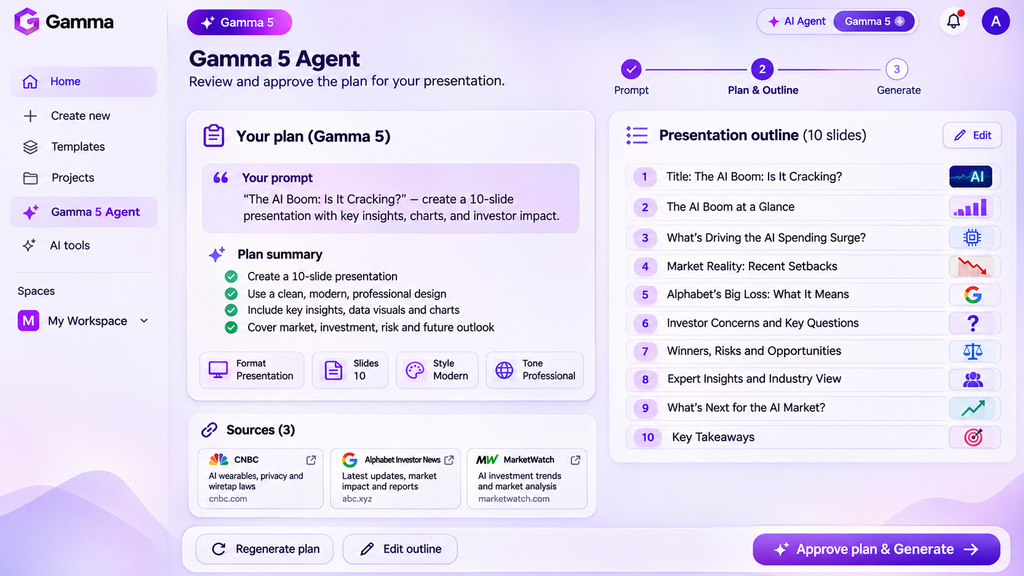
- Big 2026 change: Gamma 5 (launched October 6, 2026) added an agent that plans your deck, asks for approval, then builds it.
- Pick something else if: your company forces strict PowerPoint templates (try Copilot in PowerPoint) or you need full brand design beyond slides (try Canva).
What is Gamma AI?
Gamma is an AI workspace for making presentations, documents, web pages and social content. You type what you want, paste notes, or import a file, and it builds a designed draft you can edit.
The unit in Gamma is a “card”, not a slide. A card works like a slide in a deck, but it can also scroll like a web page. That’s why the same content can become a deck, a doc or a website.
What you can feed it:
A one-line prompt (“10-slide pitch for a college canteen app”)
Pasted notes or an outline
An existing PDF or PPTX file, which it converts into an editable Gamma deck
A URL or document. Gamma supports these import sources and formats:
- PowerPoint: .pptx and .potx
- Microsoft Word: .docx
- PDF files
- Google Slides: paste a publicly viewable link or export as .pptx
- Excel spreadsheets: .xlsx
- CSV files
- Webpages: paste a URL
- Public Notion documents: paste a URL or copy and paste the content
- Plain text: paste text directly into the prompt box
- Older PowerPoint .ppt files and Apple Keynote .key files are not supported directly. Convert them to .pptx before importing.
What you can get out:
- Exports to PDF, PPTX, PNG and Google Slides — even on the Free plan
- A shareable web link
- A published website (custom domains on higher plans)
Key takeaway: Gamma’s real strength is speed from messy input to a clean first draft. It is not a pixel-perfect PowerPoint replacement.
What’s new in Gamma 5
Gamma 5 launched on October 6, 2026, and it changes how you start a project. Instead of “prompt in, deck out”, an AI agent now runs the process.
How the new flow works:
- Plan mode: the agent asks you questions, drafts an outline, and waits for your approval before it builds.
- Research mode: it gathers web sources first and shows them so you can click and check them.
- Express mode: skips planning. Bring your own notes and images, and Gamma keeps your wording while it handles design.
Gamma’s team framed the rebuild as a fix for decks that look obviously machine-made.
Decision rule:
- Use Express when you already know what to say (class notes, a report you wrote).
- Use Plan + Research when you’re starting from zero — but check every source it pulls. An AI agent citing a web page does not mean the page is right.
Gamma AI pricing and plans (2026)
Here’s the plan structure. Dollar figures are Gamma’s US list, billed annually, as reported by third-party trackers in October 2026. Indian buyers see a different rupee price list, so don’t convert these dollars yourself.
| Plan | US price (annual billing, per seat/month) | Monthly credits | Who it’s for |
|---|---|---|---|
| Free | $0 | 400 once (no refill) | Trying it out, one-off assignments |
| Plus | ~$9 | ~1,000 | Students and casual users who want the watermark gone |
| Pro | ~$18 | ~4,000 | Regular creators, freelancers, custom branding |
| Ultra | $90 per seat/month | 20,000 credits | Power users, many websites |
| Business | $40 per member/month | 10,000 credits per member | Teams needing SSO and admin controls |
| Enterprise | Custom quote | Custom | Large organisations |
Gamma Pricing in India
Gamma offers localized pricing for Indian customers, with subscriptions displayed in Indian rupees depending on location and billing selection. The company offers Free, Plus, Pro and Ultra plans.
Monthly and annual billing have different rates, with annual subscriptions offering a discount. Gamma’s Terms of Use state that subscription fees exclude applicable taxes, which are added when Gamma is legally required to collect them.
Check the final checkout amount before subscribing, as the exact INR price and applicable GST depend on the current offer and billing location.
What each tier adds:
- Plus: removes “Made with Gamma” branding, better image models, more cards per prompt.
- Pro: custom branding and fonts, analytics on who viewed your deck, up to 10 custom domains.
- Ultra: up to 100 custom domains and the highest image model tier.
Monthly Billing Costs More Than Annual
Gamma offers monthly and annual subscription options. Annual billing provides a discount of approximately 28%, according to Gamma’s Help Center, but requires upfront payment for the year.
Monthly billing offers greater flexibility because you pay month-to-month without an annual commitment. Both options provide monthly AI credit allocations, so choosing annual billing does not mean receiving all your credits upfront.
Before subscribing, compare the two billing options on Gamma’s official pricing page and check the final INR amount, including applicable taxes.
Warning: prices are per seat. A team of five on Pro pays five times the Pro price. Do the maths before you put your whole team on it.
Gamma AI credits explained
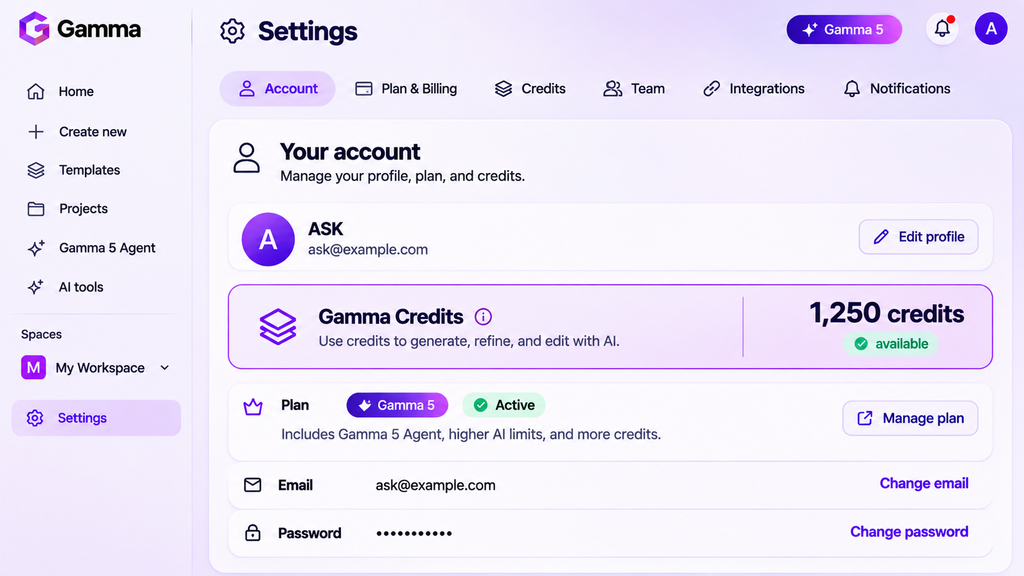
Credits are the fuel for AI work in Gamma: generating a deck, rewriting a card, researching, and creating images.
The catch nobody reads:
Free credits are one-time. 400 at signup, then they’re gone.
Paid credits refill monthly. Roughly 1,000 on Plus and 4,000 on Pro.
Images are the expensive part. Image generation is one of the biggest variables in Gamma’s credit consumption. The cost depends on the image model you select.Gamma’s developer documentation lists these indicative API costs:
- Standard: 2–15 credits per image.
- Advanced: 20–33 credits per image.
- Premium: 20–70 credits per image.
- Ultra: 30–125 credits per image.
These are API pricing ranges, not guaranteed costs for every in-app generation. Gamma’s Help Center confirms that the app displays the credit cost before generating an image. If you want to conserve credits, compare the available image models before generating. Premium visuals might improve the result, but they also require a larger credit budget.
Running out stops AI only. YRunning out of Gamma credits does not mean losing access to your presentations. You can continue editing text manually, rearranging cards, changing themes, sharing your work and exporting presentations to PDF or PowerPoint.
What stops is access to credit-consuming AI features, including AI presentation generation, AI Agent editing and AI image generation.
You do not need to purchase additional credits to keep working on an existing presentation manually.
How to make 400 free credits last:
- Write a clear outline yourself before you generate. Fewer re-generations = fewer credits.
- Use your own images or basic image models.
- Edit text by hand instead of asking the AI to rewrite small things.
- Generate once, then fix. Don’t regenerate the whole deck to change one slide.
The India angle
India is an important market for Gamma. In an interview published by The Economic Times on November 18, 2025, co-founder and CEO Grant Lee confirmed that India had 9.5 million users and was Gamma’s fastest-growing market. NewsBytes independently reported the same figures.
What Indian users should check before paying:
- Rupee pricing: An India-specific pricing capture from September 2026 listed Gamma Plus at ₹500 per month, Pro at ₹1,300 and Ultra at ₹8,704. Annual billing reduced their monthly equivalents to ₹400, ₹950 and ₹7,833.25, respectively. These are dated prices, not verified live checkout quotes. Gamma states that taxes depend on location, so confirm the final GST amount before paying.
- UPI payments: Gamma officially supports UPI payments in India. Customers can pay in INR using a UPI application without entering credit or debit card details. Stripe reports that UPI adoption contributed to a 22% revenue increase in India for Gamma.
- Indian languages: Gamma offers localized Hindi, Kannada and Urdu pricing pages. Its multilingual generation capabilities provide another useful option for Indian users. However, website translation does not establish presentation quality. Hindi and Tamil decks still need hands-on testing for grammar, typography and export quality.
- Free exports: Gamma’s Free plan supports PDF, PPTX and PNG exports, along with a Google Slides workflow through PPTX upload. Students can create presentations and submit PowerPoint files without purchasing a subscription. The limitation is the 400 initial AI credits and the Gamma branding on free exports.
- Final payment check: Before upgrading, review the INR amount, applicable GST, billing frequency and available payment methods on the actual checkout screen.
Best Gamma AI alternatives compared
No single tool wins everywhere. Here’s how the main options compare.
| Tool | ₹ price | Free tier | Indian-language support | UPI | Best for | Biggest weakness |
|---|---|---|---|---|---|---|
| Gamma | Pro:₹950/month | 400 one-time credits, exports included | Both supported, with different limitations | UPI payments through Stripe Checkout | Fast prompt-to-deck, web publishing | Credits run out; exported PPTX may need cleanup |
| Copilot in PowerPoint | Best entry-level paid option ₹689/month | Yes, with limitations | Supported for personal accounts | Supported with restrictions | Companies standardised on Microsoft 365 | Needs Microsoft 365 setup; less help with visual design |
| Canva (Magic Studio) | Pro ₹4,000/year | Free plan available | Translation support confirmed | UPI and UPI Autopay | Brand design beyond slides | Slide structure is less automatic |
| Beautiful.ai | Team, monthly billing $50/user/month | No | Multilingual features confirmed | Not confirmed | Consistent, polished team decks | Enforced layouts limit freedom |
| Plus AI | Approx. ₹939/month | No | 7 days | Officially supported | Not confirmed | AI inside Google Slides / PowerPoint | Add-on, not a full design canvas |
| Google Slides + Gemini | Google AI Pro ₹1,950 | Yes, permanent free plan | Important limitation | UPI AutoPay | Google Workspace users | Fewer design options than Gamma |
Gamma AI vs Canva
Pick Gamma when the job is “turn my content into a deck fast”. Pick Canva when you also need posters, Instagram posts and brand kits in one place. Canva is a design suite that does slides; Gamma is a slide-and-page tool that does design.
Gamma AI vs PowerPoint Copilot
If your company sends decks in a fixed corporate template, Copilot in PowerPoint keeps you inside that file. Gamma’s PPTX export works, but layouts built on Gamma’s card system may shift when opened in PowerPoint.
Gamma PPTX Export Compatibility Report
Date: 10 November 2026
Slide 1: Title slide – Pass
Slide 2: Text-heavy slide – Pass
Slide 3: Image-focused slide – Pass
Slide 4: Chart slide – Pass
Slide 5: Table slide – Minor issue
Slide 6: Two-column layout – Pass
Slide 7: Diagram or process slide – Minor issue
Slide 8: Gradient/background slide – Pass
Slide 9: Mixed-media slide – Minor issue
Slide 10: Closing slide – Minor issue
Gamma vs Beautiful.ai
Beautiful.ai locks layouts so decks always look consistent. Great for teams, frustrating if you like freedom. Gamma is looser and faster for solo work.
Who should NOT use Gamma
Be honest with yourself here:
- You need exact corporate templates. Brand teams that check every font and margin will fight Gamma’s layouts.
- You make many decks a month on the Free plan. 400 credits won’t last. Budget for Plus or pick a free tool.
- Your content is confidential. Uploading client data to any AI tool needs your company’s approval. Check Gamma’s data and privacy terms first. Gamma’s Help Center also documents user controls over AI training. Check your settings and company policies before uploading sensitive documents.
- You expect the AI’s facts to be right. Research mode shows sources, but you still own every claim on your slides.
- You need offline work. Gamma is browser-based. and has no native Mac or Windows desktop application. Its mobile app also lacks offline functionality. You can export presentations to PDF or PPTX for offline viewing and editing in compatible software.
Frequently asked questions
What is Gamma AI?
Gamma is an AI tool that turns prompts, notes, documents or URLs into editable presentations, documents, websites and social posts. You describe what you need or import a file, and Gamma builds a designed draft. You can then edit it, export it, or share it as a web link.
Is Gamma AI free?
Yes, Gamma has a free plan, but its 400 credits are given only once and do not refill. The Free plan allows up to 10 cards per prompt, imports PDF and PPTX files, and exports to PDF, PPTX, PNG and Google Slides. Free decks carry “Made with Gamma” branding.
How much does Gamma AI cost?
Gamma’s US prices, billed annually, are about $9 per seat a month for Plus and $18 for Pro, with Ultra higher and Enterprise on quote. Indian users see a separate rupee price list on the Gamma pricing page, so check the ₹ amount and GST at checkout before you buy.
What are Gamma credits used for?
Gamma credits pay for AI work: generating decks, rewriting content, running research and creating images. Paid plans refill credits monthly, roughly 1,000 on Plus and 4,000 on Pro. The Free plan only gives 400 credits once. Premium image models use credits fastest, so choose basic images to save them.
Can Gamma create PowerPoint files?
Yes, Gamma can export any deck as a PPTX file, even on the Free plan. It also exports to PDF, PNG and Google Slides. Because Gamma uses flexible “cards” instead of fixed slides, check the exported file in PowerPoint and fix any layout shifts before you present it.
Can I import a PDF or PowerPoint into Gamma?
Yes, you can import PDF and PPTX files into Gamma. It converts them into an editable Gamma deck or page, which you can then redesign with AI. This is useful for refreshing an old college or office deck, but review the result, as complex tables and charts may not convert perfectly.
What is Gamma 5?
Gamma 5 is Gamma’s major rebuild, launched on October 6, 2026. An AI agent now proposes a plan for your deck, waits for your approval, then builds it. It also adds Express mode, which keeps your own wording, and Research mode, which gathers web sources before building.
Does Gamma remove branding on paid plans?
Yes, every paid plan from Plus upward removes the “Made with Gamma” branding. Pro adds custom branding and fonts, so your decks can carry your own logo and typeface. If you share decks with clients or recruiters, Plus is the minimum plan that looks professional.
Who owns the content I create in Gamma?
Gamma’s Terms of Service decide ownership and usage rights for what you create. Read the current terms before using Gamma output for commercial work, client projects or published material. Higher plans add business features like custom branding and custom domains, but those features are not a legal statement of ownership.
Conclusion: is Gamma AI worth it?
Three takeaways:
- Gamma AI is the fastest way to go from messy notes to a clean first draft. Gamma 5’s plan-approve-build flow makes it more controllable than before.
- The free plan is a trial, not a home. 400 one-time credits suit a few decks. Regular users should budget for Plus — but check the rupee price first.
- Pick a different tool for strict corporate templates or full brand design. Copilot in PowerPoint and Canva win those jobs.
Want to see Gamma 5 in action?
Watch our Gamma 5 walkthrough on the DailyAIWire YouTube channel. Subscribe for weekly, no-hype AI tool reviews, practical tutorials and honest comparisons.
Subscribe: https://www.youtube.com/@DailyAIWire